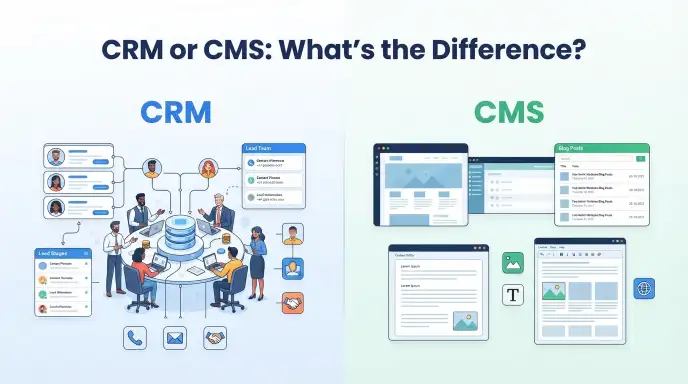
Choosing between CRM or CMS depends on what you need your software to manage. A CRM manages customer relationships, sales, and interactions, while a CMS manages website content such as pages, blog posts, images, and other digital content.
People often search for “CRM or CMS” because both systems are common business tools, but they solve very different problems. A CRM helps a business understand and manage its customers. A CMS helps a business create, organize, edit, and publish content on a website.
The confusion can grow because modern business platforms sometimes include features from both categories. Some systems can connect a website to customer records, marketing tools, forms, and sales data. Still, the core purpose remains different.
Understanding these two systems can help you choose the right tool for your website or business. This guide explains what CRM and CMS mean, how they differ, when to use each one, common mistakes, practical examples, and how they can work together.
CRM or CMS: Featured Snippet Answer
A CRM is used to manage customer relationships, sales activities, leads, and interactions. A CMS is used to create and manage website content such as pages, blog posts, images, and videos. Businesses often use both because a CRM manages customers while a CMS manages the website content those customers see.
CRM or CMS: Quick Answer
The simplest difference is:
- CRM: Customer Relationship Management
- CMS: Content Management System
A CRM is useful for:
- Managing customer information
- Tracking leads
- Recording customer interactions
- Managing sales opportunities
- Supporting customer service
- Following the sales process
A CMS is useful for:
- Creating website pages
- Publishing blog posts
- Managing images and media
- Editing website content
- Organizing content
- Managing multiple website contributors
For example, a sales team may use a CRM to track a potential customer who filled out a website form. The marketing team may use a CMS to publish the article that attracted that visitor.
What Does CRM or CMS Mean?
CRM and CMS are abbreviations for two different types of business software.
What Is CRM?
CRM stands for Customer Relationship Management.
A CRM stores and organizes information about customers and prospects. It can help businesses track contact details, conversations, purchases, sales opportunities, and customer support activity.
A sales representative might use a CRM to see:
- Customer name
- Email address
- Previous interactions
- Sales stage
- Follow-up date
- Purchase history
The goal is to give a business a clearer view of its relationship with each customer.
What Is CMS?
CMS stands for Content Management System.
A CMS allows people to create, edit, organize, and publish digital content without needing to manually build every page with code.
A website CMS can manage:
- Web pages
- Blog posts
- Images
- Videos
- Categories
- Menus
- Authors
- information
For example, WordPress is widely used as a CMS because it lets users create and manage website content through an administrative interface.
CRM vs CMS in Simple Terms
Think of a business as having two different areas:
CRM: Who are our customers, and how do we manage our relationships with them?
CMS: What content do we publish, and how do we manage our website?
That simple distinction makes the difference easier to remember.
The Origin of CRM or CMS
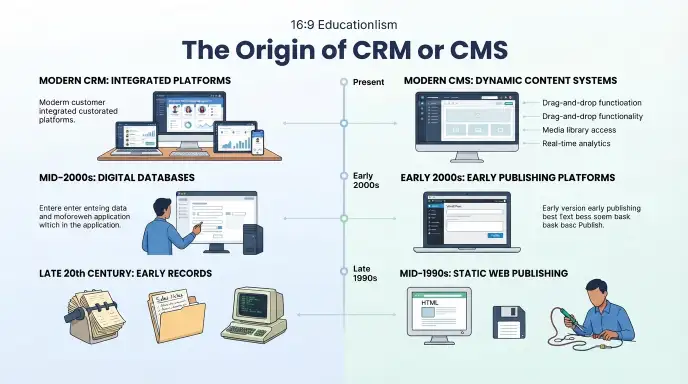
The terms CRM and CMS developed from different areas of business technology.
Origin of CRM
Customer relationship management grew from earlier systems designed to organize customer information and sales activities. As businesses moved from paper records and spreadsheets toward specialized software, CRM platforms became more sophisticated.
Modern CRM systems can bring sales, marketing, customer service, and customer data into one system.
The term customer relationship management describes the broader business practice as well as the software used to support it.
Origin of CMS
Content management systems developed as websites became more complex and businesses needed easier ways to publish online content.
Early websites often required technical knowledge to update individual pages. CMS platforms made content management easier by separating much of the content-editing process from the underlying website code.
As websites grew, CMS platforms expanded to support publishing workflows, media libraries, user permissions, templates, plugins, and tools.
British English vs American English
The terms CRM and CMS are technical abbreviations, so their meaning does not change between British and American English.
| British English | American English | Example |
| CRM | CRM | Our CRM stores customer information. |
| CMS | CMS | Our CMS manages website content. |
| Customer Relationship Management | Customer Relationship Management | The CRM supports customer relationships. |
| Content Management System | Content Management System | The CMS manages website pages. |
There is no British or American spelling difference in the abbreviations themselves.
Businesses in the United Kingdom, United States, Canada, Australia, and other English-speaking regions commonly use the same terms.
Technical documentation and software interfaces may use slightly different wording, but CRM and CMS remain standard abbreviations.
Which Version Should You Use?
There is no need to choose between a British and American version. Instead, choose the system that matches your business need.
United States
Use a CRM when your main goal is customer, sales, or lead management.
Use a CMS when your main goal is website content management.
United Kingdom
The same distinction applies. A CRM can support sales and customer service, while a CMS manages website content.
Canada
Canadian businesses can use either system based on their operational needs. The terminology remains the same.
Australia
Australian organizations also use CRM and CMS for their standard business and website functions.
International Writing
For international audiences, spell out the abbreviation the first time it appears:
Customer Relationship Management (CRM)
Content Management System (CMS)
This makes the content easier for readers who may not know the abbreviations.
Academic Writing
Define both terms before using the abbreviations repeatedly. This is especially useful in reports and research papers.
Business Writing
Use CRM and CMS consistently after defining them. Avoid treating the terms as interchangeable because they refer to different software categories.
Common Mistakes
Mistake 1: Thinking CRM and CMS Are the Same
Incorrect idea:
A CMS and CRM both manage the same business information.
Correct explanation:
A CMS primarily manages digital content, while a CRM primarily manages customer relationships and related business data.
Memory tip:
CRM = Customers. CMS = Content.
Mistake 2: Calling a CRM a Website Builder
Incorrect:
“We need a CRM to create our blog.”
Better:
“We need a CMS to create and manage our blog.”
A CRM may connect with a website, but website content is normally managed through a CMS.
Mistake 3: Calling a CMS a Customer Database
Incorrect:
“Our CMS is where we track every sales conversation.”
Better:
“Our CRM is where we track customer and sales information.”
A CMS can collect form submissions through additional tools, but that does not make it a complete CRM.
Mistake 4: Assuming Every Business Needs Only One
Many businesses benefit from both systems.
A company might use a CMS to publish educational articles and a CRM to manage people who contact the company after reading those articles.
Mistake 5: Choosing Software Based Only on Popularity
A popular platform is not automatically the right solution for every business.
Consider your:
- Business size
- Website needs
- Sales process
- Marketing activities
- Budget
- Team skills
- Integration requirements
- Future growth
Everyday Examples
Emails
A CRM can help a sales representative track an email conversation with a potential customer.
A CMS can help a marketing team publish the article that brings visitors to the website.
Business Writing
A business may use its CRM to manage leads while using its CMS to publish service pages.
News Headlines
A news website may use a CMS to publish and organize stories. Its advertising or sales team may use a CRM to manage business relationships.
Blogs
A blogger can use a CMS to write, edit, categorize, and publish articles.
If the blogger sells services, a CRM can help manage prospective clients.
Social Media
A CMS can manage website content that is promoted on social media.
A CRM can help track people who respond to campaigns or become leads.
Academic Writing
A university website may use a CMS to publish course information and news.
Its administrative teams may use CRM-style systems to manage relationships with prospective students or other audiences.
Daily Conversation
You might say:
“Our CMS runs the website, but our CRM manages our customers.”
That sentence captures the basic difference.
Google Trends & Modern Usage
Searches for “CRM or CMS” often come from business owners, marketers, website managers, students, and people comparing software solutions.
The confusion is understandable because both systems are connected to digital business operations. A website may collect leads, display forms, send marketing messages, and connect to customer data. These overlapping features can make the two categories seem similar.
Modern businesses may connect a CMS and CRM so information can move between the website and customer-management system.
For example:
- A visitor reads a blog post on a CMS.
- The visitor completes a contact form.
- The form sends information to a CRM.
- A salesperson follows up with the lead.
- The business records the interaction in the CRM.
Exact Google Trends statistics can change over time, so no specific search-volume figures are included here without verified current data.
Quick Comparison Table
| Version | Meaning | Correct? | Main Purpose | Example |
| CRM | Customer Relationship Management | Yes | Customer and sales management | Track leads |
| CMS | Content Management System | Yes | Website content management | Publish blog posts |
| CRM + CMS | Connected business systems | Yes | Customer and content workflows | Capture website leads |
| CRM instead of CMS | Different tool category | Usually not | Customer management | Manage sales contacts |
| CMS instead of CRM | Different tool category | Usually not | Content management | Manage website pages |
Key Takeaways
- CRM means Customer Relationship Management.
- CMS means Content Management System.
- A CRM focuses on customers, leads, sales, and interactions.
- A CMS focuses on website content and publishing.
- CRM and CMS are not interchangeable terms.
- Many businesses use both systems together.
- Choose a CRM when customer management is the main need.
- Choose a CMS when website content management is the main need.
FAQs
Is CRM the Same as CMS?
No. CRM and CMS perform different jobs. A CRM manages customer relationships, leads, sales activity, and interactions, while a CMS manages website content such as pages, articles, images, and other digital materials.
What Is the Main Difference Between CRM and CMS?
The main difference is what each system manages. A CRM focuses on customers and business relationships. A CMS focuses on creating, organizing, editing, and publishing website content.
Can a CMS Be Used as a CRM?
Some CMS platforms offer customer or contact features through built-in tools, plugins, or integrations. However, a CMS is primarily designed for content management, while a dedicated CRM is designed specifically for customer and relationship management.
Can a CRM Manage Website Content?
Some CRM platforms include marketing and website-related features, but content management is not usually their primary purpose. A CMS is generally better suited for managing website pages, blog posts, media, and publishing workflows.
Do I Need Both a CRM and CMS?
You may need both if your business has an active website and a structured customer-management process. The CMS can manage your website content, while the CRM can organize leads, customers, sales activity, and follow-ups.
Is WordPress a CRM or CMS?
WordPress is primarily a Content Management System. It is designed to create and manage websites and digital content. CRM features can be added through plugins or integrations, but customer relationship management is not its core function.
Which Is Better, CRM or CMS?
Neither is universally better because they solve different problems. A CRM is appropriate for managing customers and sales, while a CMS is appropriate for managing website content. Your business goal should determine which system you need.
What Does CRM Stand For?
CRM stands for Customer Relationship Management. It can refer to the business process of managing customer relationships or the software used to organize customer information, sales activities, communication, and related data.
What Does CMS Stand For?
CMS stands for Content Management System. It is software that helps users create, edit, organize, and publish digital content, especially content displayed on websites.
Can CRM and CMS Work Together?
Yes. They can work together through integrations or connected tools. For example, a CMS can collect information through a website form, while the CRM stores and manages that information as a lead or customer record.
Conclusion
CRM and CMS are both important business technologies, but they have different purposes. A CRM focuses on customer relationships, while a CMS focuses on website content. Understanding this difference makes it much easier to choose the right software for a particular task.
A CRM can help a business organize leads, customer details, sales activities, communication, and follow-ups. A CMS can help teams create web pages, publish articles, manage media, and maintain an organized website.
Many businesses do not have to choose only one. A CMS and CRM can work together as part of a larger digital system. For example, a CMS can attract visitors through useful content, while a CRM can help the business manage visitors who become leads or customers.
Discover More About Vocabulary!

Hi, I’m Olivia Bennett, an English grammar and spelling content writer. I enjoy exploring confusing words, spelling differences, and everyday language questions. My goal is to share clear, simple, and helpful explanations that make English easier to understand.






1 thought on “CRM or CMS: A Simple Guide to the Difference”